Industrial Digital Printing Systems: From Data to Final Print
Industrial digital printing systems use digital data to produce text, graphics, images, codes, and variable information directly onto a wide range of materials.
Unlike traditional printing methods that often require physical plates or cylinders, digital systems can transfer artwork and production data directly to the printing equipment.
These systems are increasingly integrated into manufacturing, packaging, labeling, product decoration, and industrial marking processes. Their combination of digital workflow, precise ink deposition, automated material handling, and process controls allows manufacturers to manage changing designs and variable information efficiently.
Why Industrial Digital Printing Systems Matter
Modern manufacturing often requires more than a fixed printed image. Products may need unique serial numbers, barcodes, batch information, variable graphics, or customized designs.
Industrial digital printing equipment can receive this information electronically and reproduce it directly on the target substrate. Depending on the system, digital printing can support:
- Variable data printing
- High-resolution graphics
- Product identification
- Barcode and QR code printing
- Packaging graphics
- Decorative applications
- Short and medium production runs
- Automated production workflows
Digital printing can also reduce the need for physical printing plates when designs change frequently.
Main Components of Industrial Digital Printing Systems
A complete digital printing system consists of several integrated components.
| Component | Primary Function |
|---|---|
| Digital controller | Processes artwork and print data |
| Printheads | Deposit ink onto the substrate |
| Ink delivery system | Supplies ink to printheads |
| Substrate handling | Moves material through the printer |
| Drying or curing system | Stabilizes printed ink |
| Sensors | Monitor position and process conditions |
| Inspection system | Checks print quality |
| Software interface | Controls jobs and production data |
The exact configuration depends on the printing technology, substrate, production speed, and application.
How Industrial Digital Printing Systems Work
The process begins with digital information and ends with a finished printed surface. Several stages work together to maintain accurate positioning and consistent print quality.
1. Digital File Preparation
The first stage involves preparing the artwork or production information. A digital file can contain text, graphics, images, logos, barcodes, or variable data.
Specialized workflow software can convert the file into instructions that the printing system understands.
2. Data Processing
The digital controller processes the incoming information and determines how individual elements should be reproduced.
For variable-data applications, the system may receive information from databases, enterprise software, manufacturing systems, or production-control platforms.
3. Substrate Preparation
The substrate must be suitable for the selected ink and printing technology. Materials may include:
- Paper
- Cardboard
- Plastic films
- Metal
- Glass
- Wood
- Textiles
- Coated materials
- Manufactured components
Surface cleanliness and characteristics such as surface energy can influence ink adhesion and print quality.
4. Material Feeding
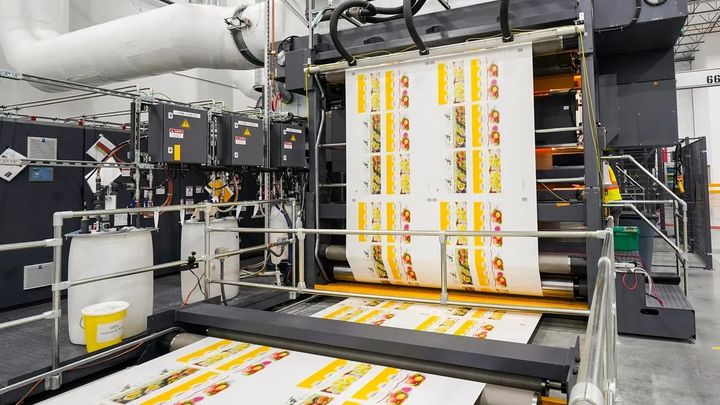
The substrate is transported through the printing system using conveyors, rollers, vacuum systems, or web-handling mechanisms.
Accurate material positioning is important because the printheads need to deposit ink at precisely controlled locations.
5. Ink Deposition
The printheads apply tiny droplets of ink onto the substrate according to the digital image.
In many industrial inkjet printing systems, the printhead does not physically contact the material. Instead, electronically controlled nozzles release droplets at specific locations.
This non-contact approach makes inkjet technology suitable for many flat and irregular surfaces.
6. Image Formation
Individual ink droplets combine to form text, images, graphics, or codes.
Color systems can use multiple ink channels to reproduce a broader range of colors. Resolution, droplet size, printhead configuration, and substrate characteristics all influence image quality.
7. Drying or Curing
After ink deposition, the printed material may pass through a drying or curing stage.
Depending on the ink technology, this can involve heated air, infrared energy, ultraviolet light, or other methods. Proper curing helps improve adhesion, durability, and handling characteristics.
8. Inspection
Modern systems may use cameras and sensors to inspect the finished print.
Automated inspection can identify issues such as:
- Missing print
- Incorrect data
- Poor registration
- Color variation
- Barcode defects
- Nozzle problems
- Surface imperfections
Major Types of Industrial Digital Printing
Different digital technologies serve different applications.
Inkjet Printing
Inkjet technology is widely used for industrial printing because it supports non-contact application and variable data. Continuous inkjet and drop-on-demand systems are two major approaches.
UV Digital Printing
UV printing uses ultraviolet energy to cure specially formulated inks shortly after they are deposited. It can be used for applications requiring immediate handling and durable printed surfaces.
Thermal Inkjet
Thermal inkjet systems use controlled heating to generate droplets from ink chambers. They can provide high-resolution printing for selected industrial and coding applications.
Digital Textile Printing
Specialized digital systems can deposit textile inks directly onto fabrics. These systems can support detailed patterns, variable designs, and digitally controlled production.
Industrial Applications
Industrial digital printing systems are used across many sectors.
Packaging
Digital systems can print product graphics, variable information, barcodes, promotional designs, and other packaging content.
Product Identification
Manufacturers can print serial numbers, batch codes, dates, QR codes, and other traceability information directly onto products or components.
Electronics
Digital printing can support selected electronics manufacturing processes, including specialized markings and material deposition applications.
Automotive Components
Industrial printers can apply identification marks, graphics, labels, and selected decorative finishes to automotive components.
Building Materials
Panels, flooring materials, ceramics, glass, and other building products can use digital printing for decorative patterns or product identification.
Digital Printing vs. Traditional Printing
Digital and conventional printing technologies have different operating characteristics.
| Feature | Digital Printing | Traditional Printing |
|---|---|---|
| Physical plates | Generally not required | Often required |
| Variable data | Highly suitable | More limited |
| Design changes | Quick to implement | May require setup changes |
| Short production runs | Well suited | May require more preparation |
| Personalization | Strong capability | More complex |
| Workflow | Digital | Often plate-based |
The appropriate technology depends on production volume, substrate, image requirements, setup requirements, and desired workflow.
Benefits of Industrial Digital Printing Systems
Industrial digital printing can provide several operational advantages when the technology matches the application.
Flexible Production
Digital files can be changed without producing new physical printing plates. This can be useful when manufacturers handle multiple designs or frequent product variations.
Variable Data
Each printed item can contain different information. This is useful for serial numbers, barcodes, product codes, and other variable content.
Reduced Setup Requirements
Because digital systems can receive print data electronically, changing from one design to another can be relatively straightforward compared with plate-based processes.
Integration With Automation
Digital printers can communicate with production software, sensors, conveyors, inspection systems, and databases.
Factors to Consider When Selecting a System
Choosing an industrial digital printing system requires an assessment of the complete production process.
Consider:
- Substrate compatibility: Ensure the system and ink technology work with the intended material.
- Print resolution: Determine the required level of detail.
- Production speed: Match printer throughput with the manufacturing line.
- Ink technology: Consider adhesion, durability, drying, and curing requirements.
- Print width: Select equipment appropriate for the required coverage.
- Variable data requirements: Evaluate software and data integration capabilities.
- Automation: Consider conveyors, sensors, inspection, and production controls.
- Maintenance: Review printhead cleaning, ink handling, and routine maintenance requirements.
- Environmental conditions: Temperature, humidity, dust, and other factors can affect performance.
Best Practices for Consistent Digital Printing
Proper process control can help maintain reliable output.
- Keep substrates clean and properly prepared.
- Use compatible inks and materials.
- Maintain printheads according to technical specifications.
- Monitor ink supply and delivery conditions.
- Calibrate print systems regularly.
- Maintain accurate substrate positioning.
- Monitor drying or curing conditions.
- Inspect printed output during production.
- Maintain accurate digital production data.
- Follow preventive maintenance schedules.
Frequently Asked Questions
What are industrial digital printing systems?
Industrial digital printing systems are automated or semi-automated printing technologies that use digital data to apply text, graphics, images, codes, or other information directly to industrial substrates.
How does industrial digital printing work?
Digital artwork or production data is processed by a controller, converted into print instructions, and sent to printheads. The printheads deposit controlled ink droplets onto the substrate, followed by drying or curing.
What materials can industrial digital printers print on?
Depending on the technology, industrial digital printers can work with paper, cardboard, plastic films, metal, glass, textiles, wood, ceramics, and other treated or coated materials.
What is the difference between digital and conventional printing?
Digital printing generally receives artwork electronically and does not require traditional physical plates. Conventional printing methods may use plates, cylinders, or screens to transfer images.
Where are industrial digital printing systems used?
They are used in packaging, product identification, labeling, electronics, automotive components, building materials, textiles, decorative products, and various manufacturing processes.
Conclusion
Industrial digital printing systems connect digital data with automated printing equipment to produce graphics, identification marks, variable information, and specialized printed surfaces. The process involves digital file preparation, data processing, substrate handling, ink deposition, image formation, curing, and quality inspection.
As manufacturing becomes increasingly data-driven, digital printing provides a flexible approach for applications involving variable information, changing designs, and automated production workflows. Selecting the appropriate system requires careful consideration of the substrate, ink technology, print requirements, production speed, and integration needs.