Cloud-Based CRM Tools: Features, Benefits & Selection Guide
Cloud-based CRM tools have changed how businesses manage customer relationships, sales activities, communication, and business data.
Instead of relying on software installed on individual computers, cloud CRM platforms store information online and allow authorized users to access it through connected devices.
For growing organizations, this approach can bring customer information, sales pipelines, communication records, tasks, and reporting into one centralized environment. Understanding the main capabilities of cloud-based CRM tools can help businesses determine which platform best matches their operational needs.
What Are Cloud-Based CRM Tools?
Cloud-based CRM tools are customer relationship management platforms hosted on remote servers and accessed through the internet. The provider typically manages the underlying infrastructure, software updates, maintenance, and data storage.
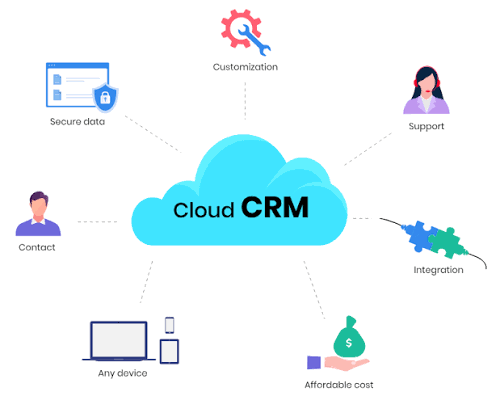
Users can generally access CRM information through a web browser or dedicated application. Depending on the platform, features may include contact management, sales tracking, marketing automation, customer support, analytics, workflow automation, and third-party integrations.
How Cloud CRM Works
A typical cloud CRM environment connects customer-related information in a centralized database.
For example, a sales representative may update a prospect's information after a meeting. The updated record can then become available to other authorized teams, such as customer support or account management.
This shared environment reduces the need to maintain separate customer records across spreadsheets, emails, and disconnected applications.
Key Features of Cloud CRM Software
Different cloud CRM software platforms provide different capabilities, but several features are common across modern systems.
Contact Management
Contact management allows teams to organize information about customers, prospects, accounts, and other business relationships.
Typical records can include:
- Names and contact details
- Company information
- Communication history
- Account activity
- Notes and tasks
- Purchase or interaction history
- Lead status
Centralized records make it easier for teams to understand customer interactions before taking the next action.
Sales Pipeline Management
Sales pipeline features help teams monitor opportunities as they progress through defined stages.
A CRM may provide visual pipeline views showing:
- New leads
- Qualified prospects
- Opportunities
- Negotiations
- Closed opportunities
Managers can use pipeline information to understand sales activity and identify opportunities requiring attention.
CRM Automation Tools
CRM automation tools can reduce repetitive administrative work by triggering predefined actions.
Examples include:
- Automatically assigning leads
- Sending follow-up notifications
- Creating tasks
- Updating opportunity stages
- Triggering email sequences
- Generating alerts
- Recording selected customer activities
Automation can help teams maintain consistent processes while reducing manual data entry.
Reporting and Analytics
Reporting features transform CRM data into useful business information.
Common reports include:
- Lead conversion rates
- Pipeline activity
- Sales performance
- Customer acquisition metrics
- Team activity
- Revenue forecasts
- Campaign performance
Dashboards can provide managers with a quick view of important indicators without requiring them to examine individual customer records.
Benefits of Cloud-Based CRM Software
Cloud-based CRM software can provide several operational advantages when implemented appropriately.
Accessible Customer Information
Authorized users can access CRM records from different locations and supported devices. This can be particularly useful for organizations with distributed teams or employees who frequently work outside a central office.
Centralized Data
A centralized CRM database can reduce fragmented customer information. Sales, marketing, and support teams can work from a shared source of customer information instead of maintaining separate databases.
Easier Collaboration
When teams have appropriate access permissions, multiple departments can view relevant customer information and coordinate activities more effectively.
Scalable Infrastructure
Cloud platforms can often accommodate additional users, records, workflows, and integrations as an organization expands. The exact scalability depends on the provider and selected plan.
Automatic Updates
Cloud CRM providers generally manage software updates on their infrastructure. This can reduce the need for organizations to manually install updates across individual computers.
Cloud CRM Platforms vs. Traditional CRM Systems
Cloud CRM platforms differ from traditional locally installed CRM systems in several important areas.
| Factor | Cloud CRM | Traditional CRM |
|---|---|---|
| Access | Internet-connected devices | Usually local network or device |
| Infrastructure | Provider-hosted | Organization-managed |
| Updates | Usually provider-managed | Often manually managed |
| Remote collaboration | Generally easier | May require additional setup |
| Scalability | Often flexible | Depends on infrastructure |
| Maintenance | Provider handles much of it | Organization handles more |
| Integration | Usually API-based options | Depends on system architecture |
The appropriate approach depends on business requirements, security policies, infrastructure preferences, and technical resources.
CRM Tools for Small Businesses
CRM tools for small businesses should generally prioritize simplicity and practical functionality rather than unnecessary complexity.
Important capabilities may include:
- Contact management
- Lead tracking
- Task management
- Email integration
- Basic reporting
- Calendar integration
- Mobile access
- Workflow automation
Small teams should also consider how quickly employees can learn the platform. A sophisticated CRM that is difficult to use may create unnecessary operational friction.
Cloud CRM Solutions for Growing Businesses
As organizations grow, CRM requirements often become more sophisticated.
A growing company may require:
- Multiple sales pipelines
- Advanced permissions
- Automated workflows
- Marketing integrations
- Customer support functionality
- Detailed analytics
- API access
- Team performance dashboards
- Data import and export capabilities
The CRM should be able to support increasing data volumes and more complex workflows without creating excessive administrative overhead.
CRM Software Integrations
Integrations are an important part of modern CRM ecosystems. Businesses frequently use CRM platforms alongside email, calendars, accounting applications, marketing platforms, communication tools, ecommerce systems, and analytics software.
Common Integration Categories
Cloud CRM platforms may integrate with:
- Email applications
- Calendar platforms
- Marketing automation systems
- Customer support applications
- Accounting software
- Ecommerce platforms
- Communication systems
- Data analytics tools
- Project management platforms
Integration capabilities can reduce duplicate data entry and create smoother information flows between business applications.
CRM Software Security Considerations
Because CRM systems can contain sensitive customer and business information, security should be evaluated before implementation.
Access Controls
Role-based permissions can limit what different users can view or modify. Organizations should follow the principle of giving users only the access required for their responsibilities.
Authentication
Multi-factor authentication can provide an additional security layer beyond passwords.
Data Protection
Businesses should understand how the provider protects data during transmission and storage, as well as how backups and recovery processes are handled.
Compliance
Organizations operating in regulated industries or multiple jurisdictions should examine applicable privacy and data protection requirements before selecting a CRM platform.
How to Choose the Right Cloud CRM
Selecting among cloud CRM platforms requires a structured evaluation.
1. Identify Business Requirements
Start by documenting the processes the CRM needs to support. Consider sales management, customer communication, marketing activities, reporting, support, and collaboration.
2. Evaluate Essential Features
Create a list of must-have and optional capabilities. Avoid selecting a platform based only on the number of features it advertises.
3. Examine Ease of Use
A CRM should be understandable to the people who will use it every day. Evaluate navigation, data entry, dashboards, mobile access, and workflow configuration.
4. Review Integration Options
Check whether the CRM can connect with the organization's existing technology stack. Native integrations and APIs can be particularly important for larger workflows.
5. Assess Security
Review authentication, access controls, encryption practices, backup procedures, audit capabilities, and relevant compliance documentation.
6. Consider Total Ownership Requirements
Evaluate subscription structure, implementation requirements, data migration, training, integrations, administration, and ongoing operational requirements rather than looking at a single pricing figure.
Common Mistakes When Implementing CRM Tools
Even a capable CRM platform can produce disappointing results if implementation is poorly planned.
Common mistakes include:
- Migrating inaccurate or duplicate data
- Creating unnecessarily complicated workflows
- Giving every user excessive permissions
- Failing to define data standards
- Ignoring employee training
- Adding too many integrations immediately
- Measuring activity instead of meaningful outcomes
A phased implementation can make it easier to identify problems before expanding the system across the entire organization.
Who Can Benefit From Cloud-Based CRM Tools?
Cloud-based CRM systems can support many types of organizations, including:
- Small businesses
- Growing companies
- Sales teams
- Marketing departments
- Customer support teams
- Professional organizations
- Ecommerce businesses
- B2B companies
- Distributed teams
The ideal platform depends on business size, workflow complexity, customer volume, integration requirements, and internal technical capabilities.
Frequently Asked Questions
What are cloud-based CRM tools?
Cloud-based CRM tools are customer relationship management platforms hosted on remote infrastructure and accessed through the internet. They help organizations manage customer information, sales activities, communication, workflows, and reporting.
What are the benefits of cloud CRM software?
Key benefits can include centralized customer information, remote accessibility, easier collaboration, automated updates, scalable infrastructure, workflow automation, and integration with other business applications.
Are cloud CRM tools suitable for small businesses?
Yes. Cloud CRM platforms can be suitable for small businesses when the selected system provides essential capabilities without unnecessary complexity. Contact management, lead tracking, automation, reporting, and integrations are common priorities.
What features should CRM software include?
Important features can include contact management, sales pipeline tracking, task management, automation, reporting, dashboards, integrations, mobile access, permissions, and security controls.
How do I choose the best cloud-based CRM tools?
Begin by identifying business requirements, then compare essential features, usability, integrations, security, scalability, implementation requirements, and ongoing administration needs. Testing the platform with representative workflows can also help with evaluation.
Conclusion
Cloud-based CRM tools provide a centralized environment for managing customer relationships, sales activities, communication, workflows, and business information. Their combination of accessibility, automation, collaboration, analytics, and integrations makes them useful across many organizational structures.
The best choice is not necessarily the platform with the largest feature list. Businesses should focus on workflow fit, usability, security, integration capabilities, scalability, data quality, and long-term operational requirements.
A structured evaluation followed by careful implementation can help organizations turn cloud CRM software into a practical foundation for better customer management and more consistent business processes.