Gaming PC Components Overview: Learn How Each Part Supports Performance
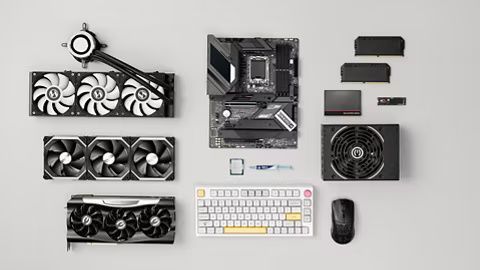
Gaming PC Components are the physical parts that work together to run games, applications, and other computer tasks. A typical gaming computer includes a processor, graphics card, memory, storage, motherboard, power supply, cooling system, and computer case. Each component performs a different function, so overall performance depends on how these parts interact.
The idea of assembling computers from individual components has developed alongside personal computing. Instead of treating a computer as one complete unit, users can understand its individual parts and how each contributes to processing, graphics, storage, connectivity, and temperature control.
Understanding the Main Components
The processor, commonly called the CPU, handles instructions and general calculations. It manages many tasks that occur behind the scenes while a game is running, including game logic, artificial intelligence calculations, background processes, and communication between hardware components.
The graphics processing unit, or GPU, focuses on rendering images and visual effects. It has a major role in determining graphical detail, frame generation, display resolution, lighting effects, and other visual elements in modern games.
Memory, commonly called RAM, temporarily holds information that the CPU and applications need to access quickly. Storage devices such as solid-state drives retain games, operating systems, applications, and personal files when the computer is turned off.
The motherboard connects these components and allows them to communicate. It contains sockets, expansion slots, memory slots, storage connections, and other interfaces that determine which hardware can work together.
How Components Work Together
A gaming computer does not depend on one component alone. When a game starts, data is loaded from storage into memory, instructions are processed by the CPU, and graphical information is sent to the GPU for rendering.
The power supply distributes electrical power to the different components. Cooling hardware moves heat away from processors and other heat-producing parts. The case provides physical structure and helps manage airflow, cable placement, and component installation.
Importance
Gaming PC Components matter because different games place different demands on computer hardware. A game with complex graphics may depend heavily on the GPU, while a simulation with many moving objects may place greater pressure on the CPU.
Understanding these differences helps explain why two computers with similar-looking specifications can behave differently. Performance can also change depending on resolution, graphical settings, memory capacity, storage technology, cooling, and software configuration.
CPU and Gaming Performance
The CPU manages instructions that are essential to game operation. It can influence tasks such as physics calculations, character behavior, world simulation, and communication with the graphics card.
CPU performance is commonly described using factors such as core count, thread count, clock frequency, architecture, and cache. These specifications should be considered together rather than viewed in isolation.
GPU and Visual Output
The GPU processes graphical workloads and creates the frames displayed on a monitor. Its capabilities influence the resolution, graphical quality, lighting, textures, shadows, and other visual effects a game can handle.
Modern GPUs can also support technologies related to ray tracing, image reconstruction, frame generation, and hardware-accelerated video processing. Their usefulness depends on the game, software support, display resolution, and selected settings.
RAM and Storage
RAM provides temporary working space for active programs. If a computer has insufficient memory for its workload, the operating system may rely more heavily on storage, which can affect responsiveness.
Storage capacity determines how many games and applications can be retained locally. Solid-state drives generally provide faster data access than older mechanical hard drives, which can influence operating system startup and game loading behavior.
Motherboard, Power, and Cooling
The motherboard determines many hardware compatibility options. Its socket, chipset, memory support, expansion slots, and storage interfaces should match the processor and other components.
The power supply must provide appropriate electrical capacity and suitable connectors for the installed hardware. Cooling systems, meanwhile, help maintain operating temperatures by transferring heat away from components and moving warm air out of the case.
| Component | Main Role | Performance Area |
|---|---|---|
| CPU | Processes general instructions | Game logic and system tasks |
| GPU | Renders graphics | Resolution and visual effects |
| RAM | Holds active data | Multitasking and game workloads |
| SSD/HDD | Stores data | Loading and storage capacity |
| Motherboard | Connects hardware | Compatibility and expansion |
| Power Supply | Distributes electricity | Hardware stability |
| Cooling | Removes heat | Temperature management |
| Case | Houses components | Airflow and physical protection |
Recent Updates
Gaming PC hardware has continued to develop from 2024 through 2026, with manufacturers placing greater emphasis on graphics acceleration, power efficiency, artificial intelligence workloads, and advanced rendering techniques.
One noticeable trend is the growing use of AI-assisted features within graphics hardware. Modern GPUs may include dedicated processing capabilities for machine-learning workloads, which can support image reconstruction, frame generation, noise reduction, and other computational tasks.
Changes in Graphics Technology
Ray tracing has become more common across modern PC games. It calculates how light interacts with surfaces and environments to create more detailed lighting, reflections, and shadows.
At the same time, image reconstruction technologies have developed as a way to render scenes internally at a lower resolution and then reconstruct a higher-resolution image. These techniques can change the balance between visual quality and rendering workload.
Faster Storage and Memory
Solid-state storage has continued moving toward higher-speed interfaces and greater capacity. Newer storage technologies can reduce data-transfer limitations in applications that frequently move large amounts of information.
Memory technology has also progressed, with newer generations providing changes in bandwidth, capacity options, and power characteristics. Compatibility remains important because memory modules must match the motherboard and processor platform.
Greater Attention to Efficiency
Power efficiency has become an important consideration as processors and GPUs become more capable. Hardware designers are increasingly focused on performance per unit of electrical power, thermal behavior, and power-management features.
Cooling design has also received greater attention. Larger heat sinks, improved fans, liquid cooling systems, and more organized airflow layouts are among the approaches used to manage heat in higher-performance computers.
Laws or Policies
In India, gaming PC components are affected mainly by electronic equipment, environmental, consumer, and electrical safety frameworks rather than by rules specifically focused on gaming computers.
The E-Waste (Management) Rules, 2022 establish requirements concerning electronic waste management. Producers, manufacturers, refurbishers, and recyclers have responsibilities relating to the collection, processing, and environmentally appropriate handling of covered electronic equipment.
Electronic Waste Management
PC components eventually become electronic waste when they are no longer usable. Motherboards, graphics cards, power supplies, storage devices, and other electronic parts contain materials that require appropriate handling.
India's e-waste framework uses concepts such as extended producer responsibility, which places certain responsibilities on producers for managing electronic waste through approved channels.
Electrical and Product Standards
Certain electrical and electronic products may also fall under applicable Bureau of Indian Standards requirements or other regulatory frameworks. Requirements can vary according to the type of equipment and its intended use.
For users, the practical point is that electronic hardware should be handled and discarded through appropriate channels rather than treated as ordinary household waste. Applicable rules can change, so current government guidance should be checked when dealing with specific products or disposal situations.
Tools and Resources
Several technical resources can help general users understand Gaming PC Components without requiring advanced hardware knowledge.
Hardware Monitoring Tools
Hardware monitoring applications can display processor temperature, GPU temperature, memory usage, clock frequencies, fan speeds, and other system information. These readings can help users understand what the computer is doing during normal workloads or gaming sessions.
Compatibility Checkers
PC compatibility tools can compare processor sockets, motherboard platforms, memory types, storage interfaces, graphics card dimensions, and power requirements. Such tools are useful because components need compatible physical and electrical connections.
Performance Databases
Hardware specification databases provide information about CPU cores, GPU architecture, memory support, storage interfaces, and other technical characteristics. Comparing specifications in a consistent format can make hardware terminology easier to understand.
Manufacturer Documentation
Official component documentation contains information about supported memory configurations, connector types, firmware requirements, dimensions, thermal limits, and installation procedures. Motherboard manuals are particularly useful because they describe the available slots and connections on a specific board.
FAQs
What are the main Gaming PC Components?
The main Gaming PC Components include the CPU, GPU, RAM, storage, motherboard, power supply, cooling system, and case. Each part has a different role, and the components must work together through compatible interfaces.
Which Gaming PC Components affect gaming performance most?
The CPU and GPU usually have substantial influence on gaming performance, but their importance varies by game and settings. RAM capacity, storage, cooling, and the motherboard platform can also affect the overall experience.
How does RAM support Gaming PC Components?
RAM gives active programs temporary working space. Games can use RAM for game data, background processes, textures, and other information that needs quick access during operation.
Does storage affect gaming performance?
Storage can influence game installation, loading times, system startup, and data access. Solid-state storage generally provides faster access than mechanical hard drives, although the actual effect varies according to the workload.
Why is cooling important in a gaming computer?
Cooling removes heat generated by components such as the CPU and GPU. Appropriate thermal management helps hardware operate within its designed temperature range and can influence sustained performance during demanding workloads.
Conclusion
Gaming PC Components perform different but connected roles in a computer system. The CPU handles general processing, the GPU manages graphics, RAM supports active workloads, storage retains data, and the motherboard connects the major hardware. Power delivery and cooling help the system operate properly, while the case provides physical structure and airflow management. Understanding these relationships makes computer specifications easier to interpret and provides useful context for evaluating how a gaming system functions.